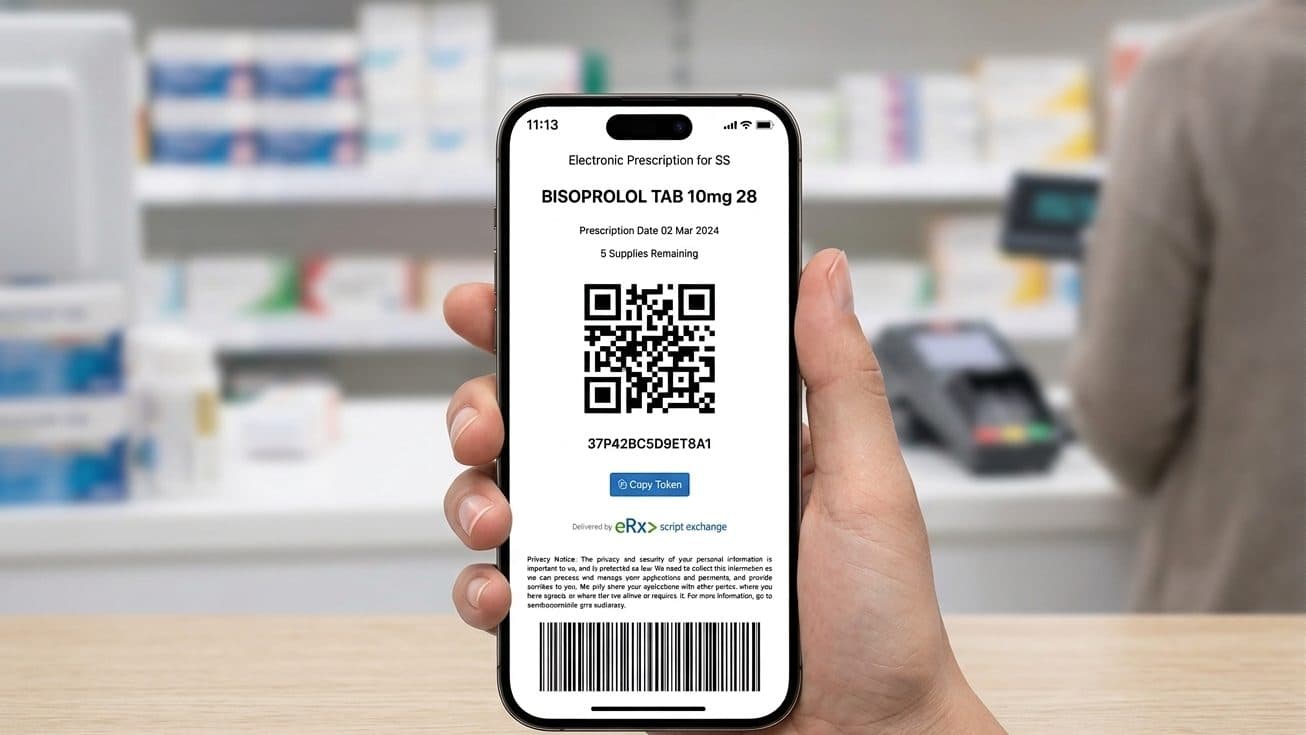
An eScript is the digital version of a paper prescription, sent to your phone as a link to a token that you show at the pharmacy. When one will not open, will not scan, or the pharmacy says it cannot be dispensed, the reason is usually small and the fix is quick.
General information, not medical advice
This guide explains how things work in general. It cannot tell you what is right for you, so check anything that affects you with your pharmacist or GP.
Always read the label and follow the directions for use.
Based on official Australian government and health sources. Rules can change.
An electronic prescription arrives as an SMS or email holding a link to your token, and you receive a separate token for each medicine prescribed, according to the Australian Digital Health Agency. The token is the code the pharmacy scans to supply one dispensing. For how the wider system fits together, see our guide to electronic prescriptions and the broader prescriptions in Australia guide.
If you are still stuck after the steps below, Healthdirect on 1800 022 222 gives free health advice at any hour.
Why an old token stops working
Each token is good for one supply. Once the pharmacy scans it and hands over your medicine, that token is spent, and the pharmacy sends a fresh token by SMS or email for your next repeat, the Australian Digital Health Agency explains. So the most common reason a code seems to stop working is that you are looking at a token already used. Check your phone for the most recent message before assuming anything is broken.
The token will not scan or load
Most scan failures are about the image on the screen, not the prescription itself. Four quick adjustments, the kind a pharmacist will suggest, clear nearly all of them.
If the code still will not read, the pharmacist can type the token key printed beneath it into their system by hand, or phone your prescriber to confirm the prescription. A scan glitch on its own is not a reason to be refused.
You have lost the SMS or email
If you delete or lose the message, you can ask for the token to be resent, and who you ask depends on which token it is, the Australian Digital Health Agency advises. For an original prescription, contact the prescriber who wrote it. For a repeat, contact the pharmacy that issued the repeat, because the pharmacy generates each new repeat token, not the prescriber.
| Token you lost | Who to contact | Why |
|---|---|---|
| Original prescription token | The prescriber who wrote it | Their clinical system created the original |
| Repeat token | The pharmacy that last dispensed | The pharmacy generates each repeat token |
resend routes from Electronic prescriptions, Australian Digital Health Agency.
Two other routes can save a trip. If your pharmacy offers its own prescription app, your active tokens may sit inside it, so it is worth asking. And if you have registered for an Active Script List, your scripts stay on that list and any pharmacy you have given access to it can open them without any token at all, which our Active Script List guide explains. If none of these work, the prescriber will need to issue a new eScript, because there is no separate lost-token recovery service.
The token looks expired
An eScript lasts as long as the paper version would. In most cases that is 12 months from the date the prescriber wrote it, though it can be shorter for some medicines and depends on state or territory law, per the Australian Digital Health Agency. Once a prescription passes its expiry it cannot be extended, and the prescriber writes a new one.
If the pharmacy says the code is expired but the prescription is well within a year, first check whether the medicine has a shorter limit. In NSW, for example, a Schedule 8 prescription is valid for six months, according to the NSW Health guide for pharmacists. Otherwise, the likely answer is the one above: you are holding a repeat token that has already been used. Look for a newer message, or ask the pharmacy that last dispensed to resend the current repeat.
The SMS went to an old phone number
If a token was sent to a mobile number you no longer use, you can ask for it to be resent, following the same original-versus-repeat split above. The clinic or pharmacy can send the new token to your current number and update your contact details at the same time, which reception can usually do without a new appointment.
The pharmacy says it cannot dispense your eScript
A pharmacy can decline to dispense for a handful of ordinary reasons, and most have a clear fix. If the medicine is out of stock, the pharmacy can order it in, or you can take the token elsewhere. Some medicines need prior approval from Services Australia before a pharmacist can supply them at the subsidised Pharmaceutical Benefits Scheme (PBS) price, and without that approval the pharmacist cannot claim it as a PBS benefit, per the Pharmaceutical Benefits Scheme; the prescriber applies for the authority, then resends the token. If the prescriber marked a brand as not substitutable and the pharmacy stocks a different one, the pharmacist will explain the options and any price difference. And a small number of older systems are not yet updated for recent eScript changes, in which case the same token will usually work at another pharmacy.
If a pharmacy declines for a reason that does not fit any of these, you can ask for the reason in writing, or raise a concern with the Australian Health Practitioner Regulation Agency (Ahpra). Ahpra says different arrangements apply in New South Wales and Queensland, and points people in those states to the NSW Health Care Complaints Commission or Queensland's Office of the Health Ombudsman.
Your token works at any participating pharmacy
You are not tied to one pharmacy. A token that is still valid and not yet used can be presented at, or forwarded to, any pharmacy set up for electronic prescriptions, the Australian Digital Health Agency notes. If you are changing pharmacies for good, our guide to transferring a prescription covers repeats held at your old pharmacy, and an Active Script List lets a new pharmacy see your scripts directly. For how repeats flow from one supply to the next, see our repeat prescriptions guide.
A valid, unused token can be presented at, or forwarded to, any pharmacy set up for electronic prescriptions, so a move or a one-off trip elsewhere never strands your script.

You have run out and cannot reach the prescriber
If you have run out of a regular medicine and cannot get a new script in time, the first step is to check whether the prescriber can see you by telehealth and send a script to your pharmacy, the Pharmaceutical Benefits Scheme advises. If that is not possible, a community pharmacist may be able to supply a one-off quantity under the Continued Dispensing arrangements.
Continued Dispensing lets an approved pharmacist supply an eligible PBS medicine at the usual PBS price, the Pharmaceutical Benefits Scheme explains. It applies when you have an immediate need, the prescriber cannot be reached, you were supplied the same medicine within the last three months, and your condition is stable, and it can be used once for a given medicine in any 12-month period. The eligible medicines are mostly for ongoing conditions like asthma, diabetes, high cholesterol and heart disease, along with oral contraceptives; controlled medicines are not included. The pharmacist decides whether supply is safe and appropriate.
A pharmacist can use Continued Dispensing for an eligible PBS medicine once in any 12-month period, and controlled medicines are not included, so it buys time until you reach your prescriber for a fresh script.
Problems only the prescriber can fix
Some problems sit with the prescriber, not the pharmacy. The Digital Health Agency suggests checking that you have received each token before you leave the appointment, which heads off the commonest of them (Electronic prescriptions, Australian Digital Health Agency). Call the clinic that wrote your script in any of these cases.
- No token arrived. A day on from your consultation and nothing has come through.
- Wrong details. The strength, quantity or brand differs from what you discussed.
- It has expired. The prescription has run out and you cannot get to the clinic.
- Not your name. A different person's name is on the token.
- Authority missing. The pharmacy needs an authority code or verbal confirmation the prescriber has not supplied.
Most clinics have a line for script queries, and reception can often resolve a token problem without booking a new appointment.
Talk to someone now
Free advice for questions about a medicine, dose, or interaction.
Frequently asked questions
It can, if the code is clear enough to scan, but a screenshot can lose sharpness, so opening the original SMS or email is more reliable. The pharmacy scans the code itself, so it does not matter whether it is on your own phone or forwarded to you, though the pharmacist may confirm your identity for some medicines.
Electronic prescriptions rely on a text or email, so if you do not have a mobile device, the Digital Health Agency says to ask your prescriber about other options, including a paper prescription you take to the pharmacy.
No. A pharmacist dispenses what the prescriber sent and cannot rewrite or extend a prescription. If the script has run out you need a new one from the prescriber, or, for an eligible medicine in a genuine emergency, a one-off supply under Continued Dispensing.
It is a routine check rather than a sign of trouble. The call might confirm an authority code, clarify an unclear detail, or verify identity for certain medicines before supply.
You register once with identification, usually at a pharmacy, though some prescribers can also register you. The first time a pharmacy asks to view your list, you give consent by text message or email, and that pharmacy can then see your list on later visits. That means your scripts are held centrally, so a lost or used token matters far less, which suits people managing several medicines.
Yes. Another person can collect your medicine using your token, whether you send it to their phone or they bring yours to the counter. The pharmacy treats it as any other token, and for certain medicines staff may ask them to confirm your details. Find a pharmacy that can dispense your eScript: browse Australian pharmacies.