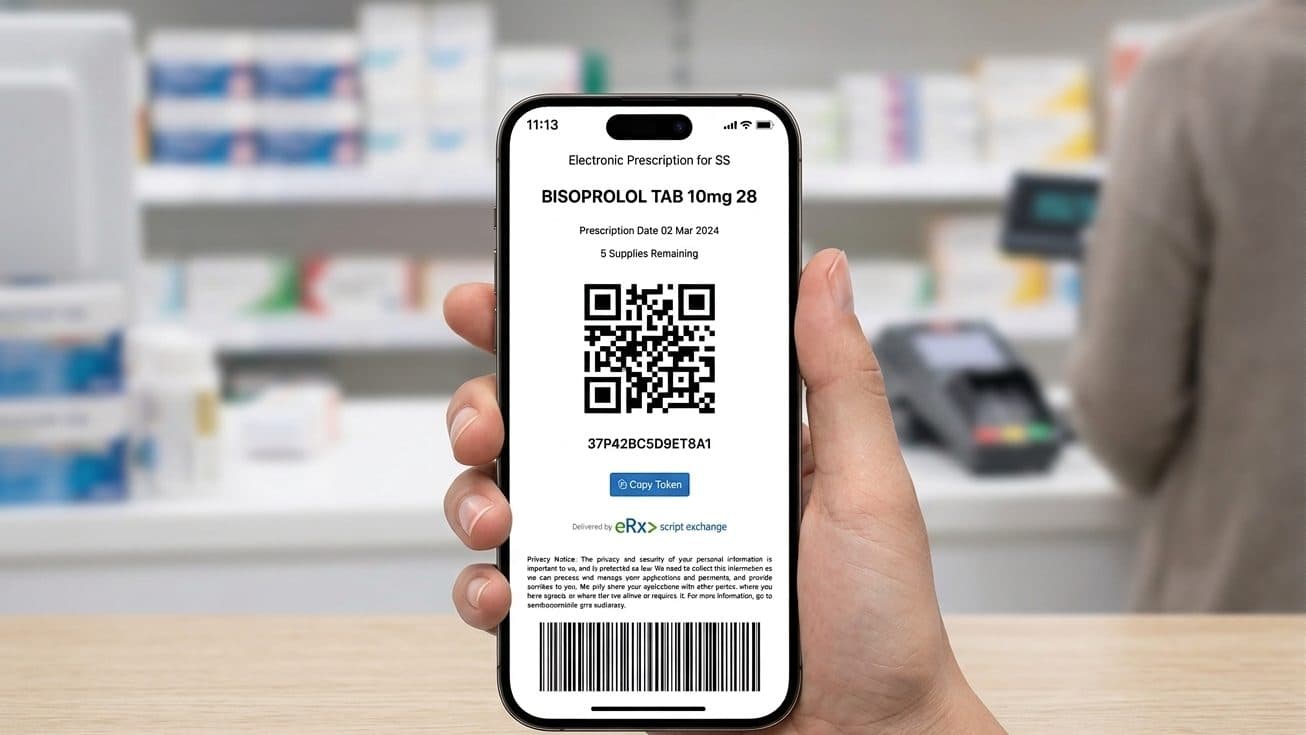
An eScript is a prescription your doctor sends to your phone instead of printing on paper. You receive a link to a token by text message (SMS) or email, and you take or forward that token to whichever pharmacy you want to fill it.
General information, not medical advice
This guide explains how things work in general. It cannot tell you what is right for you, so check anything that affects you with your pharmacist or GP.
Always read the label and follow the directions for use.
Based on official Australian government and health sources. Rules can change.
The Australian Digital Health Agency, which runs the electronic prescriptions system, describes an electronic prescription as a digital version of a paper prescription and a convenient alternative to it. Paper prescriptions have not disappeared, and the Department of Health, Disability and Ageing confirms that patients can still choose which pharmacy they use to fill a script.
Electronic prescriptions are now available across Australia, and the Australian Digital Health Agency says most pharmacies are set up to dispense them.
Filling an eScript runs through four steps, from the token landing on your phone to collecting your medicine.
What an eScript is
An eScript is a digital prescription, and the Australian Digital Health Agency notes that electronic and paper prescriptions both have to meet the relevant Commonwealth, state and territory laws. What lands on your phone is a token: a link to a unique QR code that the pharmacy scans to dispense your medicine, as Healthdirect explains. The Australian Digital Health Agency notes that you receive a separate token for each medicine you are prescribed, so a visit that produces three prescriptions sends three tokens.
The token comes to you, not to a pharmacy, so the choice of pharmacy stays yours, which the Department of Health, Disability and Ageing confirms has not changed with eScripts.
Because the system issues a fresh token for each repeat, the same token is never used twice. The next repeat token comes from the pharmacy that dispensed your last supply, as covered below.
eScripts are one part of how prescriptions work here; our guide to prescriptions in Australia covers the wider picture. Your prescriptions can be held in the system in two ways: as individual tokens you present each time, or on an Active Script List (ASL), a single consolidated list that any pharmacy you give consent to can read. Tokens are the default; the Active Script List is optional, and our Active Script List guide covers it in full.
How you receive it from your doctor
During the consultation, your doctor sends the token to your mobile by SMS or email. The Australian Digital Health Agency advises checking that the token has arrived before you finish the consultation, and speaking to your provider about other options if you do not have a mobile device.
Because the token sits on your device, a few small habits keep it easy to manage.
- Keep the message. Hold the SMS or email until your medicine has been dispensed.
- Check it arrived. Confirm the token reached your phone before the consultation ends.
- No mobile device? Ask your prescriber about other options, including a paper script.
- Prefer one list? You can have prescriptions sent straight to your Active Script List, once set up.
How to give the token to a pharmacy
You have three ways to do this. Any of them works at a pharmacy that is set up for eScripts.

Open the message, show the QR code on your screen, and the pharmacist scans it to dispense. Nothing needs printing or forwarding.
Show the QR code at the counter
Open the SMS or email and show the QR code on your screen. The pharmacist scans it and dispenses. Nothing needs forwarding.
Forward the SMS or email ahead
Many pharmacies list an email address or number for eScript orders on their website or app. The Australian Digital Health Agency notes that forwarding your token to the pharmacy lets them have the medicine ready for collection or, where the service is offered, delivered to your home. Our pharmacy delivery guide explains how home delivery works.
Send it from a pharmacy app
Some pharmacies have their own app that stores your tokens and lets you order a dispense in a couple of taps. The Australian Digital Health Agency keeps a list of mobile apps that meet the standard for handling electronic prescriptions; your pharmacist can tell you which one they use.
When someone else collects your medicine
You can forward a token to another person so they can collect your medicine for you. The Australian Digital Health Agency confirms that if you cannot get to the pharmacy, you can forward your token to a family member, carer or friend to collect on your behalf. They then show the token from your SMS or email at the counter.
For certain prescription medicines, a pharmacy may want to confirm who the medicine is for before supplying it. The requirements vary by medicine, and the pharmacist can explain what applies.
Repeats and how the next token reaches you
If your prescription has repeats, you do not return to the doctor for each supply. The Australian Digital Health Agency explains that when you have repeats, the pharmacy sends you a new token by SMS or email to use next time. You present that new token at the pharmacy of your choice for the next supply.
Because each new repeat token is separate, you can take your next repeat to a different pharmacy if you move or change your mind. Our guide to transferring a prescription covers how that works, including for paper scripts, and our repeat prescriptions guide explains how repeats function across the wider prescription system.
Once the last repeat is dispensed, no further tokens arrive, and you will need a new prescription from your doctor.
If you lose the token
A deleted message or a changed phone does not mean the prescription is gone. The Australian Digital Health Agency sets out where to go, depending on which token you lost:
- For an original prescription, contact the prescriber who issued it and ask for the token to be resent.
- For a repeat, contact the pharmacy that issued that repeat.
- A conformant pharmacy app, or an Active Script List, can also hold your active prescriptions, so a lost token matters less.
If the token cannot be resent, your doctor can issue a new prescription. For faults at the counter, our eScript troubleshooting guide covers the common problems and fixes.
Active Script List: the alternative to separate tokens
If you take several medicines, presenting a separate token each time can get cumbersome. An Active Script List answers that. The Australian Digital Health Agency describes it as a digital list of your electronic prescriptions and any barcoded paper prescriptions, so that once you are registered you no longer track each token. You give a participating pharmacy your consent to read the list, and the pharmacy dispenses from it.
You register for an Active Script List at a pharmacy, and you can change which pharmacy has access or close the list later. Our Active Script List guide covers registration and consent.
| Individual tokens | Active Script List | |
|---|---|---|
| How your scripts are held | One token per medicine, sent to your phone | All active scripts on one consolidated list |
| What you present | The token for that medicine | Consent for the pharmacy to read your list |
| Best when | You have one or two prescriptions | You take several medicines |
| Setup | Nothing to set up; it is the default | Register once at a pharmacy |
| Choice of pharmacy | Any eScript-ready pharmacy, each time | You control which pharmacy has access |
How long an eScript lasts
An electronic prescription lasts as long as the paper version would. The Australian Digital Health Agency states that this is 12 months in most cases, though it can be shorter for some medicines and may depend on the rules in your state or territory. When the prescription expires, or the last repeat is used, you need a new one from your doctor.
Talk to someone now
Free advice for questions about a medicine, dose, or interaction.
Frequently asked questions
The token is sent as a link by text message (SMS) or email, so you need a phone or email account that can receive it. If you do not have a mobile device, the Australian Digital Health Agency advises speaking to your prescriber about other options, including a paper prescription.
Yes. Electronic prescriptions are an alternative to paper, not a replacement, and your prescriber can still give you a paper or barcoded paper script. That paper copy is worth having if you do not use a mobile or are travelling somewhere with patchy reception.
Yes. The original and its repeats all run to one expiry date, so any repeats you have not used by then lapse. That date is often a year from the issue date, though shorter for some medicines. After it passes, you need a fresh prescription.
Yes. The prescription is stored in the national system, not only on your device, so a new phone does not lose it. A missing token can be resent, and a pharmacy app or an Active Script List that holds your scripts avoids the problem next time.
Yes, that is allowed. Send your token to whoever is picking up the medicine and they show it to the pharmacist, just as you would. With some medicines the pharmacy may ask them to verify your identity, so it is easier if they can give your name and date of birth.
Most community pharmacies in Australia are set up to dispense electronic prescriptions, according to the Australian Digital Health Agency. If a pharmacy cannot, another nearby pharmacy may be able to help, so it is worth calling ahead. Find a pharmacy that fills eScripts: browse Australian pharmacies.